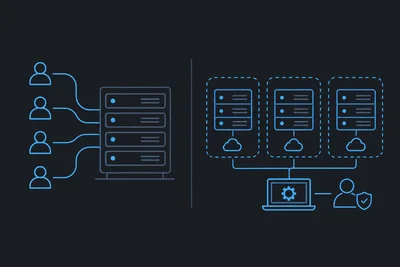
If you run an agency, you already know the headache. One client's site spikes in traffic and suddenly three other client sites slow to a crawl. A junior developer gets a little too much access and accidentally breaks a production database. A client asks who touched their site last Tuesday, and nobody has a clear answer. Hosting multiple client sites isn't just about keeping them online, it's about keeping them organized, isolated, and accountable to the right people.
Managed VPS hosting solves most of this, but only if you set it up with a plan. Here's how to actually host multiple client sites cleanly, without turning your server into a tangled mess.
Why Shared Hosting Breaks Down for Agencies
Shared hosting plans are built for one site, maybe two. The moment you're juggling ten, twenty, or fifty client sites, the cracks start showing. Resource limits get hit constantly. One site's traffic surge or bad plugin can drag down every other site on the same account. And there's rarely any real separation between clients, which makes it hard to offer any kind of service level guarantee.
This is where managed VPS hosting changes the equation. You get dedicated resources, proper isolation between sites, and the kind of control that actually scales with your client list. We've covered the broader differences in how managed VPS hosting differs from shared hosting in ways that actually matter, but for agencies specifically, the stakes are higher because you're not just managing your own reputation, you're managing your clients' as well.
Resource Isolation Matters More With Multiple Clients
When you host multiple sites on a single VPS, you still need to make sure one noisy neighbor doesn't wreck everyone else's performance. A good managed VPS setup lets you see exactly how much CPU, memory, and bandwidth each website is consuming, so you can spot the client whose traffic spike or bloated plugin is eating resources before it becomes everyone's problem.
This kind of per-website visibility is one of the most underrated parts of running an agency on managed VPS hosting. You're not guessing which site is the culprit, you can see it directly in your server analytics and act before clients even notice a slowdown.
Keeping Client Access Clean and Controlled
One of the biggest organizational problems agencies run into is access control. Maybe a freelance developer needs access to one client's site but absolutely nothing else. Maybe a client wants to see their own hosting setup but shouldn't be able to touch anyone else's. Handling this with shared logins and spreadsheets of passwords is a recipe for disaster.
A proper managed VPS setup lets you invite collaborators with scoped access, specific servers, specific websites, read-only or full access, however it needs to be sliced. You can bring on a contractor for a single project, give them access to exactly one website, and revoke it the moment the project wraps up. No shared credentials, no accidental exposure to client data they shouldn't see.
This matters even more as your team grows. You want:
- Developers who only touch the sites they're actively working on
- Clients who can view their own site's status without poking around others
- A clear audit trail of who has access to what, and when it was granted
Read-only access is particularly useful for clients who want visibility without the risk of them breaking something. They can check in on uptime or performance without ever touching a setting that could take their site down.
Staging Environments Save Agencies From Themselves
Agencies make changes constantly. New themes, plugin updates, redesigns, client-requested tweaks. Every one of those changes carries risk if you're making it directly on a live site. For a single freelancer, that risk might be tolerable. For an agency managing dozens of client relationships, one bad deployment can cost you a client entirely.
This is where staging environments earn their keep. Spin up a copy of the client's site, test your changes there, and only push to production once everything checks out. It sounds simple, but a lot of agencies skip this step because their hosting setup makes it clunky or slow. On a well-run managed VPS, staging should be quick enough that there's no excuse not to use it.
Backups as Your Safety Net Between Clients
Even with staging, mistakes happen. Someone fat-fingers a database query, or a plugin update goes sideways on production despite testing fine in staging. This is where automatic backups become non-negotiable for agencies. We run daily backups on managed plans specifically so a bad afternoon doesn't turn into a bad month, and with per-site backups, you can restore one client's site without touching anyone else's.
Monitoring Every Site Without Watching Every Dashboard
You can't babysit fifty client dashboards all day. That's where uptime monitoring does the heavy lifting. Set it up once per site and let alerts come to you when something actually needs attention, instead of manually checking each site every morning hoping nothing broke overnight.
For agencies, this changes the support conversation entirely. Instead of a client calling to tell you their site is down, you're the one reaching out first, often before they've even noticed. That's the kind of thing that keeps retainer clients around for years.
Security Can't Be an Afterthought With Client Sites
Hosting someone else's business online means their security posture is partially your responsibility now. A hacked client site doesn't just hurt them, it reflects directly on your agency. Running a web application firewall and keeping SSL certificates current across every client site shouldn't require manual tracking on your end. A good managed host handles this at the server level, so every site you host benefits automatically, rather than you having to configure it site by site.
The Takeaway
Hosting multiple client sites cleanly isn't about cramming more sites onto one server. It's about resource isolation, scoped access control, staging workflows, reliable backups, and monitoring that works for you instead of against you. Managed VPS hosting gives agencies the infrastructure to do all of this without hiring a dedicated sysadmin. Get that foundation right, and scaling from ten clients to fifty becomes a lot less stressful, for you and for them.