You write a carefully worded email, hit send, and it disappears into the void. No bounce notice. No error. Just silence — because it landed in a spam folder your recipient never checks.
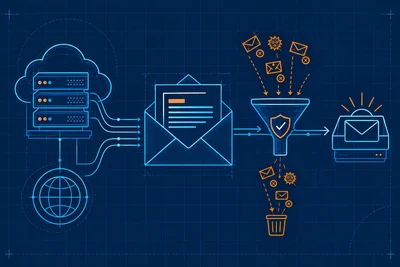
This happens more than most people realize. And understanding why it happens is the first step to fixing it. Inbox providers like Gmail, Outlook, and Apple Mail run every incoming message through a scoring process before deciding where it ends up. Email deliverability — whether your message reaches the inbox, the spam folder, or gets blocked entirely — comes down to a handful of signals they weigh every single time.
Here's what those signals actually are.
Your Sender Reputation Is the Foundation of Email Deliverability
Inbox providers don't just judge individual messages. They judge you. Every domain and IP address that sends email accumulates a reputation over time, and that reputation follows you from message to message.
Think of it like a credit score for email. If your domain has a history of sending wanted, engaged-with emails, providers give you the benefit of the doubt. If you've sent to bad lists, generated spam complaints, or have high bounce rates, that history works against every future send.
Several things feed into your sender reputation:
- Spam complaint rate. If recipients mark your emails as spam frequently, providers notice. Even a rate above 0.1% starts to hurt. Google explicitly flags anything above 0.3% as a serious problem.
- Bounce rate. Hard bounces (invalid addresses) signal that you're not maintaining a clean list. A bounce rate above 2% raises red flags quickly.
- Engagement history. Do recipients open your emails? Reply? Click links? High engagement signals that people want your messages. Low engagement — especially if recipients delete without opening — signals the opposite.
Authentication Records: The Technical Proof That You Are Who You Say You Are
Before inbox providers even look at your content, they check whether your email is actually authorized to come from your domain. This is handled through three DNS-based authentication systems: SPF, DKIM, and DMARC.
SPF (Sender Policy Framework) tells receiving servers which IP addresses are allowed to send email on behalf of your domain. Without it, anyone can spoof your address.
DKIM (DomainKeys Identified Mail) adds a cryptographic signature to your emails. The receiving server checks the signature against a public key in your DNS records. If it matches, the email hasn't been tampered with in transit.
DMARC (Domain-based Message Authentication, Reporting, and Conformance) ties SPF and DKIM together and tells receiving servers what to do if authentication fails — nothing, quarantine it, or reject it outright. It also gives you visibility into who is sending on your behalf.
Missing or misconfigured authentication records are one of the fastest ways to tank email deliverability. Gmail and Yahoo now require all three for bulk senders, and they're heading toward requiring them for everyone. Getting your DNS setup right is non-negotiable. Our DNS management overview has more on keeping those records accurate.
IP Reputation and Shared Sending Environments
Your domain reputation matters a lot — but so does the IP address your email is sent from. If you're sending through a shared IP (common with many email hosting and marketing platforms), other senders on that same IP affect your deliverability too.
This is one reason why the email infrastructure behind your sending matters as much as your own habits. A blacklisted IP will cause your emails to fail regardless of how clean your list is or how good your content is. Checking whether your sending IP appears on major blocklists like Spamhaus or Barracuda is worth doing periodically — tools like MXToolbox make this simple.
If you're sending high volumes, a dedicated IP with a properly warmed reputation is worth the investment. If you're on a shared one, choose your email platform carefully. As we touched on in why your email hosting choice affects more than just your inbox, the infrastructure behind your email has real consequences.
Content Signals That Trigger Spam Filters
Once authentication checks pass, providers look at the message itself. Modern spam filters are far more sophisticated than the old keyword-matching days, but certain content patterns still raise alarms.
Watch out for:
- Excessive use of spam trigger words. Phrases like "Act now," "Free!!!" or "Guaranteed income" are classic red flags. Context matters, but stacking these in subject lines and preheader text doesn't help.
- All-image emails with little text. Spammers use this to hide content from text-based filters. Providers are suspicious of messages with high image-to-text ratios.
- Broken or suspicious links. Links that redirect through multiple domains, use URL shorteners, or point to known bad domains will hurt your message score.
- Mismatched sender names and addresses. If your display name says one company but your sending address says something different, that's a consistency signal that providers weigh negatively.
- Missing plain-text version. Legitimate emails usually include both HTML and plain-text versions. Sending HTML-only is a minor signal, but it adds up alongside others.
List Quality and Sending Practices
How you build and maintain your list matters more than most people realize. Inbox providers infer a lot from the behavior of the people you're mailing.
If a significant portion of your list never opens anything, it drags down your engagement metrics — which feeds back into your sender reputation. The fix isn't sending more. It's sending smarter.
A few practices that protect email deliverability over time:
- Use double opt-in for new subscribers. It confirms the address is real and that the person genuinely wants to hear from you.
- Regularly prune inactive contacts. Subscribers who haven't engaged in six months or more are hurting your metrics. Remove them or run a re-engagement campaign first.
- Never purchase email lists. Bought lists are full of unknown addresses — some valid, many not, and some are spam traps specifically designed to catch senders with bad practices.
- Honor unsubscribes immediately. Continuing to mail after someone unsubscribes isn't just legally risky — it generates complaints.
Send Volume and Warming: Why Sudden Spikes Hurt You
Inbox providers pay close attention to sending patterns. A domain that normally sends 50 emails a day suddenly blasting 50,000 looks suspicious — even if everything else checks out.
If you're setting up a new domain or IP for sending, you need to warm it up gradually. Start with small volumes to engaged users. Let positive engagement signals build up before scaling. Most email platforms include warming schedules for this reason.
Dramatic sending spikes — like a product launch to your entire list after months of silence — can trip temporary throttling from providers like Gmail, which means your messages queue up or get deferred rather than delivered promptly.
The Unsubscribe Experience Matters Too
This surprises some people. The easier your unsubscribe process is, the better it is for your deliverability. When someone can't find the unsubscribe link, they hit the spam button instead. That complaint counts against you. A visible, one-click unsubscribe actually protects your sender score.
Google's bulk sender guidelines now explicitly require a one-click unsubscribe option in all marketing emails. It's both a technical requirement (the List-Unsubscribe header) and a practical one.
Putting It All Together
Email deliverability isn't one thing you fix once. It's the ongoing result of how you authenticate, what you send, who you send to, and how they respond. Every message you send is a data point in a long-running trust relationship with inbox providers.
Get the technical foundation right — authentication records, clean DNS, reputable infrastructure. Then build on it with good list hygiene and thoughtful content. That combination is what keeps your emails landing where they belong.
If you want a broader look at the technical side of getting your email setup right from the ground up, auditing your current email hosting setup is a good place to start identifying gaps.