You've probably seen the phrase "managed web hosting" thrown around a lot. But what does it actually mean in practice? And more importantly — is it the right choice for your project?
The short answer: managed hosting means someone else takes care of the server so you can focus on your website. But the long answer is more nuanced, and understanding it will help you make a smarter infrastructure decision.
The Real Difference Between Managed and Unmanaged Hosting
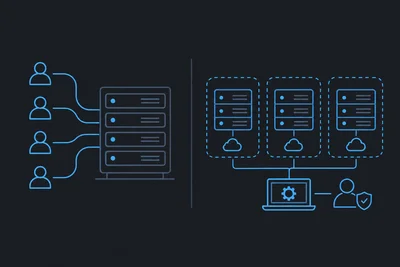
With unmanaged hosting, you rent server resources. That's it. You get root access, a blank slate, and full responsibility for everything that happens next — security patches, software updates, firewall configuration, backups, performance tuning, and recovery when things go wrong.
With managed web hosting, the provider takes on that operational layer. Your server is configured, secured, monitored, and maintained for you. You still control your website and applications — you just don't have to worry about the infrastructure holding them up.
Think of it like renting a fully serviced office versus renting an empty building. Both give you space to work. Only one of them handles the electricity, maintenance, and security so you don't have to.
What "Managed" Usually Covers
The specifics vary by provider, but a solid managed hosting plan typically includes:
- Automatic software and security updates — keeping your server stack patched without manual intervention
- Proactive server monitoring — catching issues before they affect your users
- Regular automated backups — so a bad deploy or a hack doesn't mean permanent data loss
- Built-in security layers — firewalls, DDoS mitigation, and malware scanning at the infrastructure level
- Technical support — people who know your server, not a generic help desk reading from a script
Not every provider delivers all of this equally well. We'll come back to what to look for when evaluating a managed host.
Who Should Use Managed Web Hosting?
The honest answer is: most people running production websites.
There's a common assumption that managed hosting is only for non-technical users who don't know how to manage a server. That's not true. Many experienced developers and agencies choose managed hosting deliberately — because they know how much time server management actually takes, and they'd rather spend that time building things.
If you're running a business, managing a server is almost never your competitive advantage. Your product is. Your content is. Your customers are. The server is infrastructure — and good infrastructure should be invisible.
That said, unmanaged hosting makes sense in specific cases:
- You need deep, custom server configurations that a managed environment won't support
- You have a dedicated DevOps team whose job is server management
- You're running highly specialized workloads with unusual software requirements
For everyone else — small businesses, content sites, e-commerce stores, agencies, SaaS products — managed web hosting is almost always the better trade-off.
Backups: The Detail That Separates Good Managed Hosts from Great Ones
Every managed host will tell you they do backups. What they often don't tell you is how often, where those backups are stored, and how quickly you can restore from one.
A daily backup stored on the same server it's protecting isn't much of a safety net. If the server has a catastrophic failure, you lose the backup too. Good providers store backups separately, run them automatically, and give you granular control over frequency.
For most websites, a once-daily backup is acceptable. But for high-traffic stores or sites that update frequently, that 24-hour window can mean a lot of lost data in a worst-case scenario. We let clients increase backup frequency up to four times per day — with configurable full or partial backups in between — because one size doesn't fit every site's needs.
When you're evaluating a managed host, ask specifically: How often are backups taken? Where are they stored? How long does a restore take? The answers will tell you a lot.
Security on a Managed Server: What You Should Expect
Security on a managed hosting plan isn't just about having a firewall. It's about having multiple layers of protection — and having someone responsible for keeping those layers current.
At the infrastructure level, a well-managed server should be handling:
- OS and kernel updates applied promptly (not left to you to schedule)
- A web application firewall (WAF) that filters malicious traffic before it hits your app
- DDoS protection that absorbs volumetric attacks at the network edge
- SSL/TLS certificates provisioned and renewed automatically
The important thing here is that these protections work best when they're integrated at the infrastructure level — not bolted on as afterthoughts. A WAF that's baked into the server pipeline catches threats that a plugin-level solution would miss entirely.
One thing worth understanding: even on a managed server, security is a shared responsibility. Your host secures the infrastructure. You're still responsible for your application code, your passwords, your plugin choices, and your access controls. No host can protect you from a compromised admin account or an unpatched CMS you haven't updated in two years.
Staging Environments and the Developer Workflow
This one often gets overlooked when people compare hosting plans, but it matters a lot for anyone doing active development.
A good managed web hosting setup should give you a way to test changes before they go live. Staging environments let you push updates, run tests, and verify behavior in a production-like environment — without touching your live site.
The workflow that tends to work best: develop locally, push to staging, test thoroughly, then promote to production. When that last step — moving staging to production — requires manual file copying and database exports, it introduces risk. A clean promotion tool that handles it automatically (including DNS updates if you're switching servers) removes a whole category of human error from your deployment process.
If a host doesn't offer staging environments, or if the process for promoting a staging site is cumbersome, that's a real operational friction cost. It's worth factoring in.
What to Look for When Choosing a Managed Host
Here's a practical checklist to evaluate any managed web hosting provider before you commit:
- Backup policy: How often? Where stored? Self-serve restores or support ticket required?
- Security stack: WAF, DDoS protection, automatic SSL — are these included or add-ons?
- Update management: Who patches the OS and server software, and how quickly?
- Support quality: Can you reach someone who actually knows your server, or just a tier-1 help desk?
- Developer tools: Staging environments, deployment workflows, SSH access — are these available?
- Transparency: Can you see what's happening on your server? Monitoring dashboards, logs, activity feeds?
Price matters, of course. But the cheapest managed hosting plan that skimps on backups or support will cost you more in the long run — in recovery time, lost revenue, or both — than a slightly more expensive plan that gets these fundamentals right.
The Bottom Line
Managed web hosting isn't about outsourcing control of your website. It's about outsourcing the operational burden of running the infrastructure beneath it — so you can put your time and energy into the work that actually moves your business forward.
Choose a provider that treats backups, security, and support as core responsibilities — not upsells. Ask hard questions before you sign up. And remember: the goal of good hosting is to make itself invisible, so your site just works.